
How to Accept Bookings Online and Get Paid with Nexa
Everything Nigerian service businesses need to set up a booking page, accept payments, and manage appointments, all in one app.
Table of Contents
Nigeria only (for now): Nexa Bookings is currently available exclusively for users in Nigeria. Support for more countries is on the way; stay tuned on mynexaapp.com.
What is Nexa Bookings?
Nexa is a business management app built for Nigerian service providers and small businesses. With the Nexa Bookings feature on mynexaapp.com, you can create a professional booking page, list your services, set your availability, and start accepting appointments, paid or free, in minutes.
Whether you are a hairdresser, makeup artist, fitness coach, consultant, therapist, photographer, or any other service professional in Nigeria, Nexa gives you everything you need to take your bookings online without chasing clients on WhatsApp or managing a manual diary.
The best part? Your Nexa booking page is shareable on WhatsApp, Instagram, Twitter, or any social media. Clients visit your page, pick a time that works, and pay, all without calling you.
At a glance, what Nexa Bookings includes:
- Branded booking page with your logo and banner
- Shareable link for WhatsApp, Instagram, and other social media
- Embeddable iframe you can paste into your website
- Paid or free bookings; charge upfront or offer free appointment slots
- Flexible availability; open and close dates and times whenever you want
- Manual bookings for walk-in or WhatsApp clients
- Booking management; confirm, complete, or cancel bookings
- Wallet and fast payouts directly to your Nigerian bank account
Ready to take your bookings online?
Create your free Nexa account on mynexaapp.com and set up your booking page in minutes.
Get Started Free on NexaCreate Your Services on Nexa
The first step on Nexa is to set up the services you offer. Each service has a name, description, price, duration, and the number of clients it accommodates. This is what your customers will see when they visit your Nexa booking page.
For example, a fashion designer on Nexa might create services like:
- Style Consultation: ₦10,000 / 60 mins / Up to 1 client
- Custom Outfit Fitting: ₦25,000 / 90 mins / Up to 1 client
- Wardrobe Review: ₦15,000 / 60 mins / Up to 1 client
- Bridal Styling Session: ₦50,000 / 120 mins / Up to 2 clients
Once created, each service shows as Active on your Nexa services page. You can toggle services on or off at any time, perfect for when a service is fully booked or temporarily unavailable.
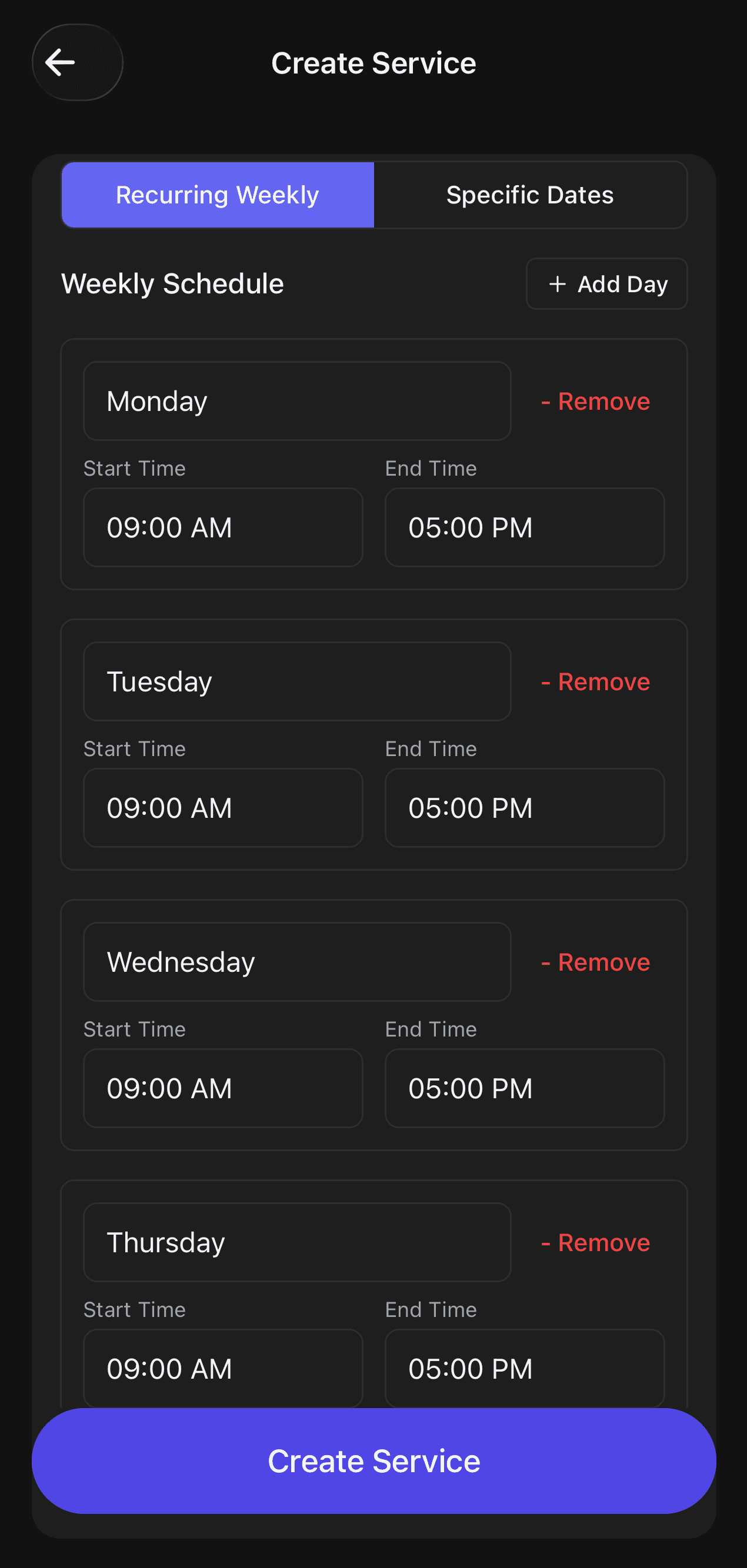
Your services listed on the Nexa app, each with a price, duration, and availability status.
Setting up services on Nexa is straightforward: tap the + button on your Services tab, fill in the details, and your service goes live on your booking page instantly.
Share Your Booking Page Anywhere
Once your services are set up on Nexa, you get a personal booking page on mynexaapp.com, complete with your branded logo and banner. This is the link you share with the world.
You can share it on:

- WhatsApp: paste it in your status or send it directly to clients
- Instagram bio: replace "DM to book" with your Nexa link
- Twitter/X, Facebook, TikTok: share it in your posts and bio
- Your website: copy the iframe code and embed your Nexa booking widget directly in your site
- Google My Business: add it as your booking link
When a client clicks your Nexa link, they see your services, pick an available date and time, and complete the booking, paid or free. No back-and-forth, no "let me check my calendar," no missed bookings.

Pro tip for Nigerian businesses:
Add your Nexa booking link to your WhatsApp Business profile description. Instead of manually replying to every "how do I book?" message, clients can self-serve and pay immediately.
Accept Paid or Free Bookings
Nexa gives you full flexibility over how clients book with you. You decide the pricing model for each service:
Paid Bookings
Clients pay upfront when they book. The money goes into your Nexa wallet, and you request a payout to your bank at any time (minimum ₦5,000).
- • Eliminates no-shows
- • Money is secured before the appointment
- • Perfect for high-demand services
Free Bookings
Clients book a slot without paying. Ideal for consultation calls, discovery sessions, or any appointment where you prefer to collect payment in person.
- • Great for first-time client introductions
- • No payment friction for entry-level services
- • Still managed fully through Nexa
You can mix both; charge for your main services and keep consultations free. Nexa handles it all from one place on mynexaapp.com.
Start accepting bookings for your business today
Join thousands of Nigerian service providers using Nexa on mynexaapp.com to book clients and get paid faster.
Create Your Nexa Booking PageManage and Track Your Bookings
Every booking made through your Nexa page shows up in your Bookings tab, organised, timestamped, and easy to manage. You can filter by status:
- Pending: awaiting your confirmation
- Confirmed: you have accepted the booking
- Completed: the service has been delivered
- Cancelled: cancelled by you or the client
Each booking card on Nexa shows the client name, service type, date, time, price charged, and your earnings after Nexa's small platform fee. You always know exactly where you stand.
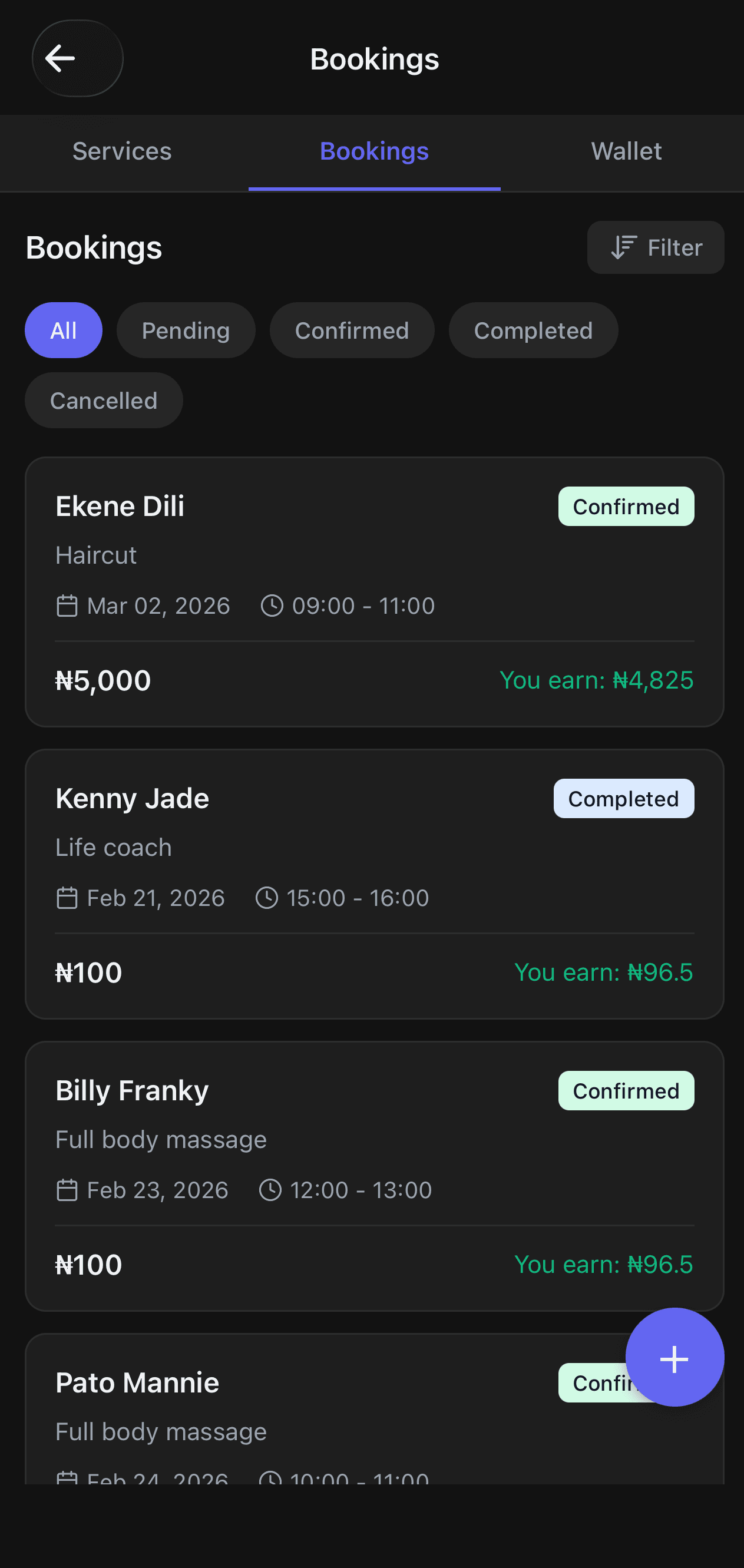
Your Nexa Bookings tab, all appointments in one place, with client details, status, and earnings.
You can control your availability on Nexa at any time. Open or close specific dates and time slots, so when you're on leave, fully booked, or just need a day off, clients can't accidentally book a slot you're not available for. No more awkward "sorry, I can't make it" messages.
Create Manual Bookings for Walk-In Clients
Not all clients will book through your Nexa link. Some will WhatsApp you directly, call, or walk in. For those, Nexa lets you create a manual booking, so all your appointments are always in one place, whether the client booked online or you added them yourself.
To create a manual booking on Nexa, you fill in:
- Service: select from your active Nexa services
- Customer name and contact: name, email, and phone number
- Date: choose the appointment date
- Start time and duration: set the exact slot
- Number of people: for group bookings
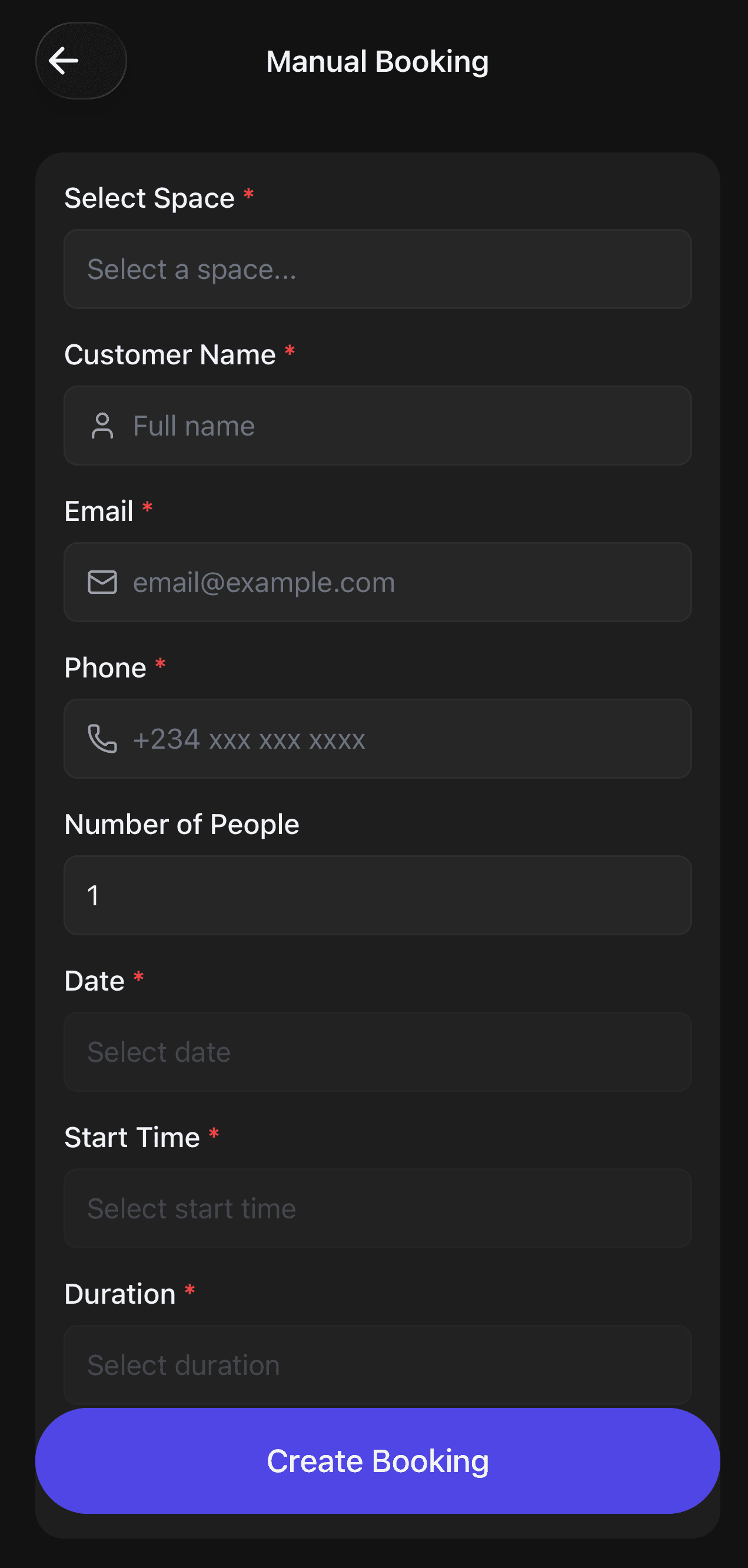
Creating a manual booking on the Nexa app for a walk-in or WhatsApp client.
Manual bookings show up in your Nexa bookings list alongside online bookings. You can confirm, complete, or cancel them just like any other appointment. Your schedule stays clean and organised; no scattered notes or forgotten bookings.
Get Paid: Wallet and Payouts
When clients pay for bookings on Nexa, the money lands in your Nexa Wallet. You can see your available balance at any time and request a payout directly to your Nigerian bank account, fast.
Setting up payouts on Nexa is simple:
- Go to the Wallet tab in your Nexa Bookings section
- Tap Add Bank and enter your bank and 10-digit account number
- Nexa verifies your account details securely via Paystack; your account name is auto-filled
- Once verified, tap Request Payout whenever you want to withdraw
- Minimum payout amount is ₦5,000
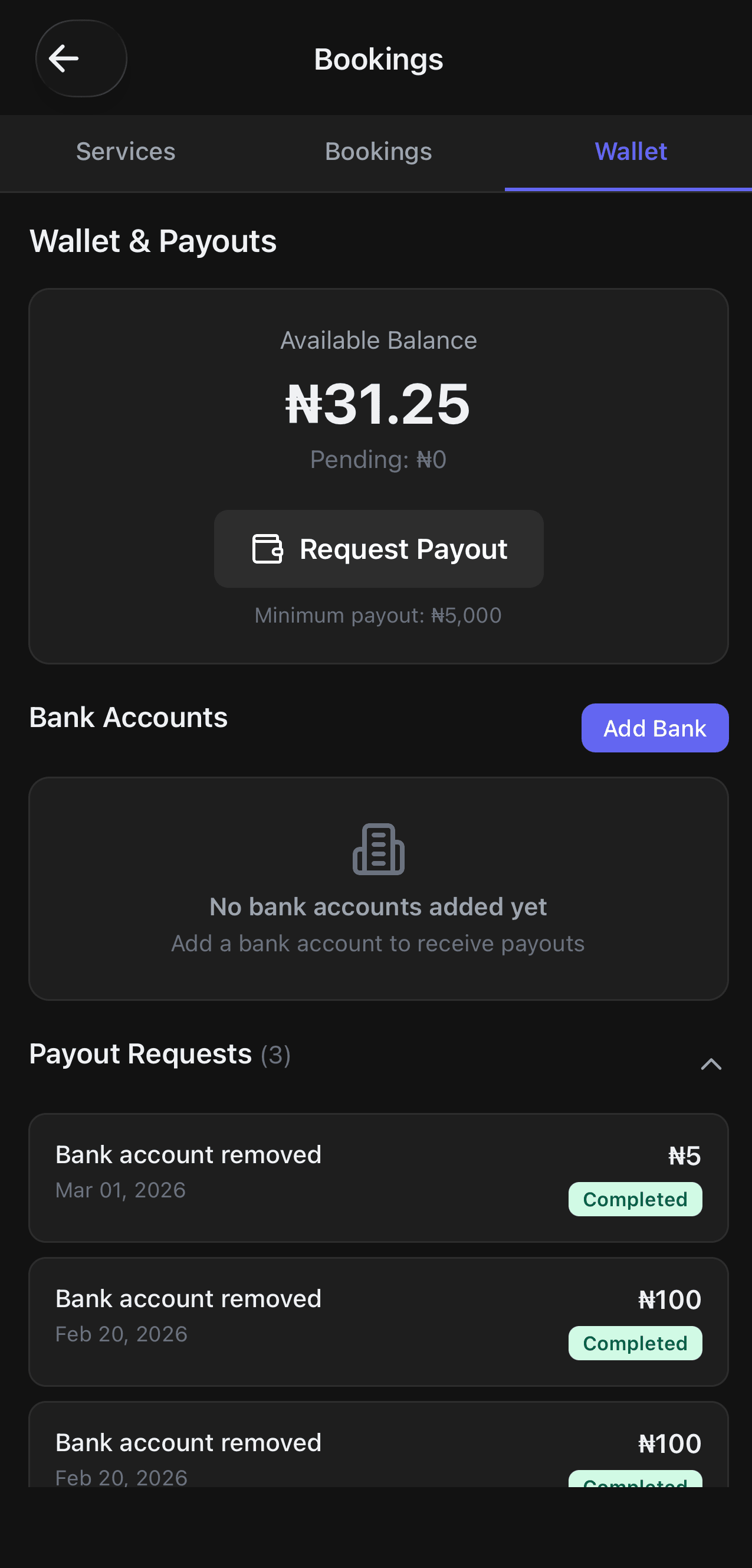
The Nexa Wallet, track your balance and request payouts to your Nigerian bank account.
All payout requests are shown in your Nexa wallet history, including the date, amount, and status. You always have a clear record of every naira that has come in from your bookings.
How Nexa earnings work:
When a client pays ₦5,000 for a haircut, you earn ₦4,825 after Nexa's small platform fee. The fee is deducted automatically; no manual calculations needed. What you see in your wallet is what you keep.
Who is Nexa Bookings For?
Nexa on mynexaapp.com is built for any Nigerian professional or small business that takes appointments. If you have been managing bookings via WhatsApp messages and voice calls, Nexa is the upgrade you need.
If your business runs on appointments, Nexa was built for you. Stop managing bookings manually; let your Nexa page do the work while you focus on delivering great service.
Your booking page is waiting on Nexa
Set up your services, share your link, and start getting booked today. Free to get started on mynexaapp.com.
Get Started on Nexa for FreeFrequently Asked Questions
Is Nexa Bookings available outside Nigeria?
Not yet. Nexa Bookings is currently available to users in Nigeria only. The team is actively working on expanding to more countries; follow updates on mynexaapp.com.
Is Nexa free to use for bookings?
Yes. Creating an account on Nexa at mynexaapp.com is free. Nexa charges a small platform fee only when a paid booking is completed. The fee is automatically deducted from the booking amount, so you never pay out of pocket.
How do clients pay for bookings on Nexa?
Clients pay securely through Paystack, Nexa's payment gateway, when they complete a booking. Payments are processed and held in your Nexa Wallet until you request a payout.
Can I embed my Nexa booking page on my website?
Yes. Nexa gives you an iframe code that you can paste into any website, so your clients can book directly from your site without being redirected anywhere.
How quickly do payouts arrive after I request them?
Nexa processes payouts quickly to your Nigerian bank account after you submit a payout request. The minimum payout amount is ₦5,000.
Can I use Nexa on my phone?
Yes. Nexa is available as a mobile app and can also be accessed from any browser at mynexaapp.com. Manage your bookings, services, and payouts from anywhere.
What if a client books outside my available times?
Nexa only shows clients the dates and times you have marked as available. When you close a date or time slot, it disappears from your booking page automatically. You are always in control of your schedule.
Stop Managing Bookings Manually. Use Nexa.
If you are still confirming appointments over WhatsApp, chasing payments after services, or losing track of who is booked for when, it is time to move to Nexa.
With Nexa on mynexaapp.com, you get a professional booking page, online payments, a clean appointment calendar, and fast payouts, all in one app designed for Nigerian service businesses.
Your clients deserve a smooth booking experience. Your business deserves to get paid on time. Nexa makes both happen.
Get Started with Nexa
Registration is done on the web dashboard at dashboard.mynexaapp.com/register. Once registered, you can manage your bookings, services, and payouts directly from your browser or download the Nexa mobile app for a full on-the-go experience. Everything, including Bookings, is available on both web and mobile.
Download the Nexa mobile app: