
Your Business Books, Kept by Conversation
How Nigerian businesses use Nexa AI to record income, expenses, invoices, and inventory without touching a form
Table of Contents
Most Nigerian business owners understand that bookkeeping matters. They know they should be tracking their income, expenses, invoices, and stock. The problem isn't awareness; it's the friction. Opening an app, tapping through fields, selecting categories, entering dates. It feels like extra work on top of an already busy day.
Nexa AI removes that friction entirely. Instead of filling out forms, you simply describe what happened, in plain English or even Pidgin, and Nexa records it for you. Income, expenses, invoices, inventory: all of it, through conversation.
Why Bookkeeping Feels Like a Chore
Talk to any small business owner in Nigeria and they'll tell you the same thing: they know what went in and what went out, but writing it all down is another story. There's always something more urgent: a customer calling, an order to pack, a delivery to chase.
The Memory Problem
You make 15 transactions in a day. By evening, you remember maybe 10 of them. By Sunday, you're guessing at the rest. Delayed recording means inaccurate records.
The Form Fatigue Problem
Switching apps, filling fields, selecting dates and categories; every extra step is a reason to skip it. Most people skip it. Then it piles up.
The Skill Gap Problem
Not everyone knows accounting. Terms like "debit," "credit," and "category" feel intimidating. Simple language that maps to familiar actions is far more accessible.
The Consistency Problem
Bookkeeping done twice a week isn't bookkeeping; it's guesswork. The lower the effort required, the more likely it gets done every day, every transaction.
Nexa AI is built to solve all four of these problems at once. You talk. It records. Your books stay up to date without extra effort.
Try Nexa AI Free Today
Join thousands of Nigerian businesses that keep their books up to date through simple conversation with Nexa AI.
Get Started FreeWhat Nexa AI Actually Does
Nexa AI is a built-in assistant inside the Nexa mobile app. You open it like a chat and describe your business activity in plain language. Nexa AI understands what you mean and automatically creates the correct record, whether that's an income entry, an expense, an invoice, or an inventory update.
There's no learning curve. You don't need to know accounting terms. You don't need to know which category something belongs to. You just describe it the way you'd tell a trusted employee, and Nexa handles the rest.
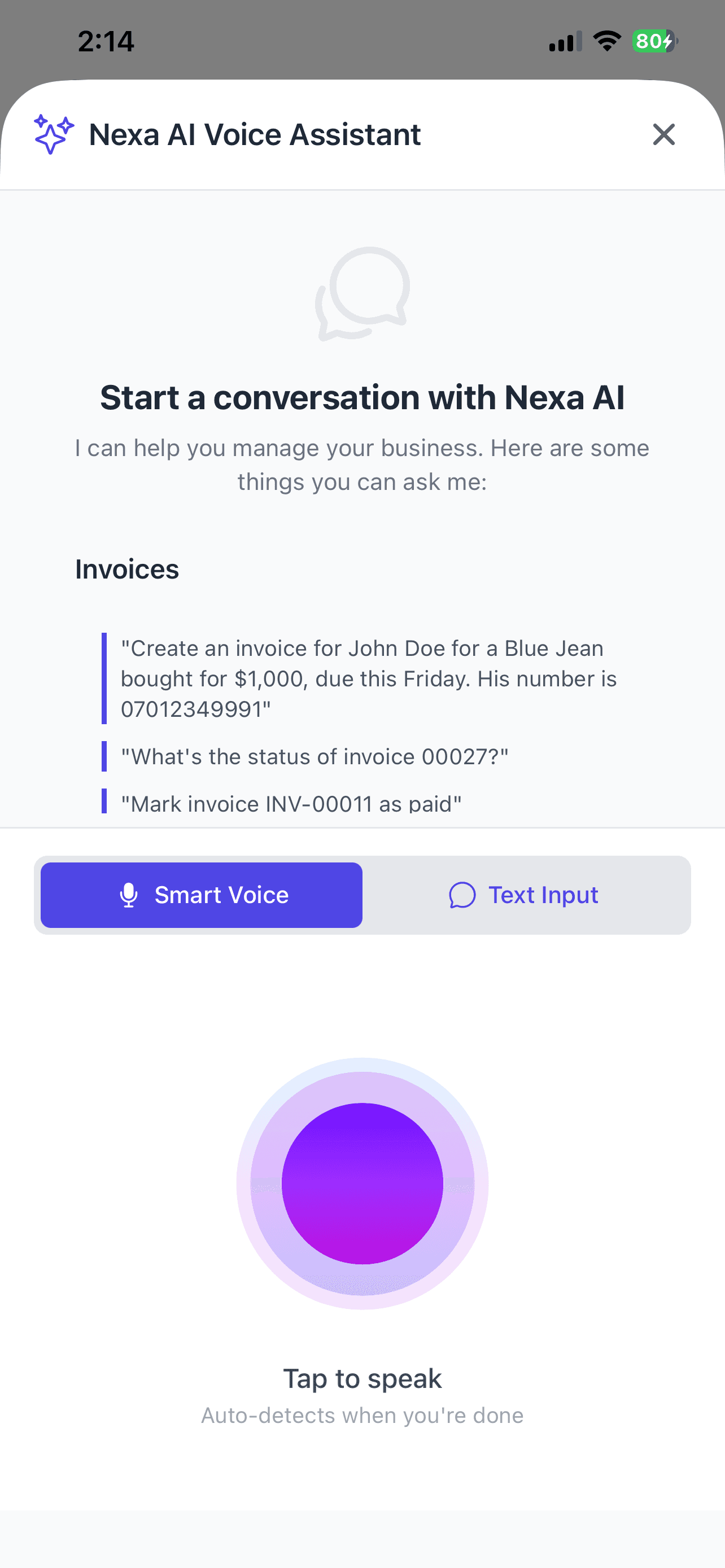
Just describe the transaction; Nexa AI records it instantly
What Nexa AI can record through conversation:
- Income: payments received from customers, sales made, service fees collected
- Expenses: money spent on supplies, utilities, salaries, rent, and any business cost
- Invoices: bills sent to customers for products or services delivered
- Inventory: stock levels, product restocks, and items sold
Recording Income with Nexa AI
Every payment you receive, recorded in seconds
Any time money comes into your business, whether it is a customer payment, a service fee, or a product sale, you can record it immediately by telling Nexa AI what happened. No form, no switching tabs, no typing into multiple fields.
"Amaka paid me ₦80,000 for the catering job today via transfer"
Creates an income entry of ₦80,000, payment method: Transfer, linked to Amaka, dated today, automatically categorised as Services.
"I sold 5 bags of rice this morning, ₦32,000 each, cash"
Records income of ₦160,000 under Product Sales, payment method: Cash, dated today.
"Received a partial payment of ₦50,000 from Chidi for the website design"
Creates an income entry of ₦50,000, links it to Chidi, marks it as a partial payment under Services income.
"Show me all my income for this month"
Displays a summary of every income entry recorded in the current month, with totals.
Why this matters
The faster you record income, the more accurate your monthly reports. Nexa AI makes it possible to record a payment while you're still on the phone with the customer; it takes five seconds.
Start Recording Your Business Income in Seconds
No spreadsheets, no forms. Just tell Nexa AI what happened and your books update automatically.
Create Your Free AccountRecording Expenses with Nexa AI
Every naira that leaves your business, accounted for
Business costs happen constantly: fuel, restock, rent, data, staff. Nexa AI lets you record each expense the moment it happens, in plain language, without interrupting whatever you're doing.
"I paid ₦45,000 for generator fuel today"
Creates an expense of ₦45,000 under Utilities/Fuel, dated today.
"Bought fabric worth ₦120,000 from Balogun market yesterday, paid cash"
Records an expense of ₦120,000 under Inventory/Materials, payment: Cash, dated yesterday.
"Paid my two staff members ₦60,000 each this Friday"
Creates an expense of ₦120,000 under Salaries & Wages, dated Friday.
"I spent ₦8,500 on airtime and data this week"
Records an expense of ₦8,500 under Communication, dated today.
Nexa AI automatically picks the right category for each expense. You don't need to know whether "generator fuel" goes under Utilities or Operations; Nexa figures it out from context.
Creating Invoices with Nexa AI
Send professional invoices without building them manually
Nexa AI can create invoices on your behalf. Tell it who the customer is, what you're invoicing for, and the amount, and it generates a professional invoice that you can send directly from the app.
"Create an invoice for Tunde for social media management, ₦75,000, due in 7 days"
Creates a ₦75,000 invoice addressed to Tunde for Social Media Management, with a due date 7 days from today. Ready to send.
"Invoice Mrs Okafor for tailoring 3 agbada sets at ₦35,000 each"
Generates an invoice for Mrs Okafor totalling ₦105,000 (3 x ₦35,000) for Tailoring, Agbada Sets.
"Has Tunde paid the invoice I sent last week?"
Checks your invoices and shows you the payment status of Tunde's most recent invoice.
"Send a payment reminder to all customers with overdue invoices"
Identifies all unpaid overdue invoices and sends reminder notifications to each customer.
Pro tip
Nexa invoices come with a built-in payment link. Your customer receives the invoice and can pay online; funds settle to your bank account by the next business day.
Create and Send Invoices in Seconds
Tell Nexa AI who to invoice and for what; it does the rest, including sending a payment link.
Try Nexa FreeTracking Inventory with Nexa AI
Know what you have in stock without counting manually
For product-based businesses, inventory is the heartbeat of the operation. Running out of stock costs sales. Over-ordering ties up cash. Nexa AI helps you stay on top of your stock through conversation; update stock levels, check what's running low, and record sales as they happen.
"I just restocked 50 units of the Ankara fabric at ₦2,500 each"
Updates inventory to add 50 units of Ankara Fabric and records a ₦125,000 expense under Inventory Restock.
"Sold 8 pairs of Air Jordan sneakers today"
Reduces Air Jordan stock by 8 units and links the sale to today's income record.
"What products are running low in stock?"
Shows all products below your reorder threshold so you know what needs restocking before you run out.
"How many units of the iPhone 15 Pro case do I have left?"
Checks your inventory and shows the current stock count for iPhone 15 Pro Case.
For Retailers
Record every sale and restock in real time. Nexa keeps a running count of each product so you always know what's in store without a manual count.
For Service Businesses
Track consumables like fabric, packaging, and raw materials the same way. Tell Nexa what you used for each job and it stays updated automatically.
Tips for Getting the Best from Nexa AI
Be Specific with Amounts and Dates
Say "yesterday" or "last Monday" if the transaction didn't happen today. Nexa AI uses that to date the record correctly. The more precise you are, the more accurate your books will be.
Mention the Customer's Name
When recording income or creating invoices, say the customer's name. Nexa links the transaction to their profile so your customer payment history stays organised automatically.
Use It Throughout the Day
Don't save it all for the end of the day. Record each transaction as it happens; it takes five seconds and means your daily summary is always accurate when you check it.
Ask Nexa Questions About Your Business
Nexa AI doesn't just record; it can also answer questions. Ask "What's my total income this week?" or "How much did I spend on transport this month?" and get instant answers from your own data.
Business owners who get the most out of Nexa AI treat it like a trusted assistant they talk to throughout the day, not a form they fill in at the end of the week. The more you use it, the more accurate and complete your financial picture becomes.
Your Books, Kept by Conversation
Income, expenses, invoices, inventory; all of it recorded through simple conversation with Nexa AI. No spreadsheets. No forms. No accountant on call. Just talk, and your books stay up to date.
Start Free on Nexa →No credit card required • 30-day free trial
Download the Nexa mobile app:
Published: April 26, 2026
This guide is for educational purposes. Features shown reflect the current version of the Nexa mobile app.
Related Articles
Three ways to keep your books up to date: manual entry, bank upload, or Nexa AI
Smart Invoicing on Nexa: Get Paid Faster with Payment Links →Send invoices with a built-in payment link and get paid by the next business day
Basic Bookkeeping Guide for Small Businesses →Everything you need to know to keep your business finances organised, compliant, and ready for growth